Physical Address
304 North Cardinal St.
Dorchester Center, MA 02124
Physical Address
304 North Cardinal St.
Dorchester Center, MA 02124

Genetic genealogy has transformed how we uncover our ancestral roots, yet the flood of DNA match data from testing companies can quickly overwhelm even experienced researchers. A DNA Match Spreadsheet serves as your command center, transforming scattered genetic connections into organized, searchable records that reveal hidden family patterns. Whether you are a beginner staring at your first match list or a seasoned researcher managing thousands of connections, the right organizational system makes all the difference between confusion and clarity.
Creating an effective DNA match tracking system requires more than simple data entry. It demands a strategic approach to organizing genetic relationships, shared centimorgans, and ethnicity estimates while maintaining strict privacy standards. This guide walks you through building a spreadsheet system that works for your specific research goals, incorporating the latest tools and techniques that genealogists are using in 2026.
By the end of this article, you will understand how to structure your match data, apply advanced methodologies like the Leeds Method for clustering unknown matches, integrate third-party tools like DNA Painter, and navigate the recent changes at AncestryDNA that affect how you access your match information.
Stepping into genetic genealogy opens a window into your past that traditional paper records cannot match. DNA testing reveals biological connections across generations, identifying relatives you might never have found through census records or family Bibles alone. However, the sheer volume of data generated by autosomal DNA tests requires thoughtful organization to extract meaningful insights.

Without proper organization, your match list becomes a frustrating puzzle of names and numbers. A well-structured DNA Match Spreadsheet transforms raw data into actionable intelligence, allowing you to sort by relationship strength, track your research progress, and identify clusters of matches that point to specific ancestral lines.
A DNA Match Spreadsheet functions as a centralized database for tracking and analyzing your genetic matches. Unlike the match lists provided by testing companies, which offer limited sorting and filtering options, a custom spreadsheet gives you complete control over how you view and categorize your DNA connections.
The primary purpose extends beyond simple record-keeping. An effective spreadsheet enables relationship mapping by tracking shared centimorgans across multiple matches, identifies triangulation opportunities by recording chromosome segment data, and supports cluster analysis through color coding and grouping features. These capabilities help you identify your Most Recent Common Ancestor (MRCA) even with matches who have not built extensive family trees.
Key benefits of maintaining a dedicated spreadsheet include:
Getting started with your DNA match organization system requires selecting the right platform and defining your data structure. The choice between Excel, Google Sheets, and Airtable depends on your technical comfort level, collaboration needs, and the complexity of your research.
For most beginners, Google Sheets offers the best entry point. It is free, accessible from any device, and allows real-time collaboration with relatives. Excel provides more powerful data analysis features for advanced users handling thousands of matches. Airtable, a relational database platform, excels at linking related records and visualizing connections through multiple view types.
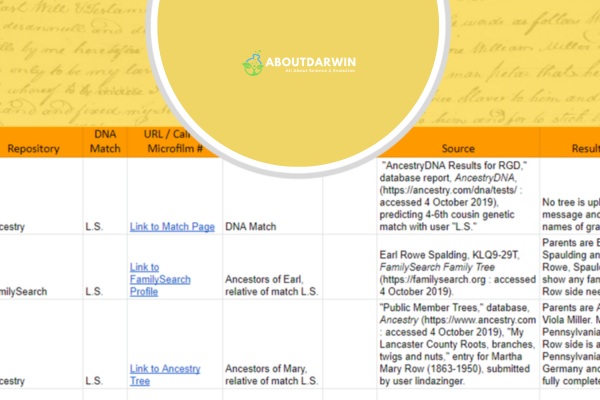
Your spreadsheet should include these foundational columns for each DNA match:
Several trusted templates are available to accelerate your setup. Greg Clarke’s Google Sheets template, widely recommended in genealogy communities, includes pre-built formulas for relationship predictions and filtering. For Airtable users, the Genealogy Explained template offers linked record capabilities that automatically connect matches sharing the same common ancestors.
When planning your layout, position frequently updated columns near the left side to minimize horizontal scrolling. Include blank columns for future data categories you might want to track, such as haplogroups, triangulation group IDs, or endogamy indicators. The Notes field deserves particular attention—use it to document communication attempts, promising leads, and observations about shared matches that might not fit structured columns.
Visual organization transforms your spreadsheet from a dense data table into an intuitive research dashboard. Color coding enables rapid pattern recognition and helps identify clusters of related matches that share common ancestors.
Apply a consistent color scheme across your maternal and paternal lines to prevent confusion. Many researchers use blue tones for paternal matches and pink or red tones for maternal matches, though any distinct combination works if applied consistently. Consider using the Leeds Method color scheme, which assigns different colors to ancestral couples based on shared match clusters, making it easy to spot which matches descend from which great-grandparent couple.
Filter functionality provides powerful sorting capabilities that go far beyond what testing company websites offer. Set up filters to show only matches above specific centimorgan thresholds, isolate unassigned matches that need maternal or paternal classification, or view matches from a single testing company. You can also create filtered views showing matches with notes indicating active research, pending contact, or confirmed relationships.
Remember that your spreadsheet is a research tool, not a work of art. The goal is functional clarity that makes navigating your genetic matches more productive. Resist the urge to over-decorate; focus on color choices that convey meaningful information at a glance.
Also Read: What and How to Use the AncestryDNA Shared Matches Tool?
One of the main benefits of maintaining a comprehensive DNA Match Spreadsheet is the capability to effectively track genetic matches and analyze intricate data that could lead you to exciting genealogical breakthroughs. This process includes meticulously recording various genetic relationships, understanding shared centimorgans with reference to validation data, as well as interpreting ethnicity estimates.
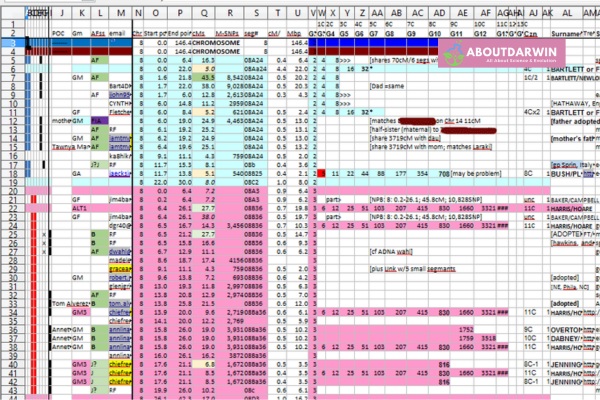
This systematic approach enables you to move beyond surface-level match lists into deeper analysis that identifies ancestral lines, validates family trees, and solves genealogical mysteries that paper records alone cannot address.
A crucial initial step in managing your DNA match data involves thoroughly documenting different levels of genetic relationships. These levels range from immediate family members like siblings and parents to distant relatives several generations removed. Setting up dedicated columns for each classification within your spreadsheet allows for smoother navigation when seeking specific relatives.
Over time, with consistent research, patterns emerge indicating common ancestors or revealing previously unknown relationships. Your spreadsheet becomes a dynamic research log that captures not just the data but your investigative progress and discoveries.
Centimorgans (cMs) play an integral role in gleaning insights from your DNA matches by measuring how much DNA two people share. This unit of genetic linkage gauges inheritance from shared ancestors—the greater number of cMs related individuals share denotes closer familial ties. However, raw cM numbers alone tell only part of the story.
Your spreadsheet should incorporate columns allocated for cM details linked with respective matches, enabling efficient visual comparison among numerous entries. The Shared Centimorgan Project, maintained by genetic genealogy researchers, provides statistical ranges that help validate relationship predictions based on actual user-submitted data. Cross-referencing your matches against these ranges significantly improves accuracy.
Typical cM ranges for common relationships include:
This numerical approach augments your ability to evaluate varying degrees of relatedness and hones in on potential shared lineage for deeper exploration. When a match falls outside expected ranges, it often signals endogamy (intermarriage within a population) or indicates a more complex relationship than initially predicted.
Most DNA test kits provide estimations regarding your ethnic origins, which can offer another perspective when determining genealogical links. Integrating this data within your spreadsheet essentially supplements the gathered genetic information and may assist in narrowing down common regions or countries among relatives.
The key lies in appropriately organizing this ethnicity data for each match without overwhelming the spreadsheet. A simple approach uses columns marked for major global regions (African, European, Asian, Indigenous American, Oceanian) where percentages could be populated. For more detailed tracking, particularly when researching specific ancestries like DNA testing for Jewish ancestry, consider adding sub-regional categories.
Remember that ethnicity estimates are just that—estimates. They should not replace traditional research but should be used as auxiliary tools to complement existing data already present within the documented DNA matches. By diligently tracking matches and effectively analyzing genetic data using this systematic approach, you become better positioned to unravel genealogical mysteries.
Also Read: What Does Great Britain DNA Mean for You?
The Leeds Method represents a breakthrough approach for organizing DNA matches when traditional family tree connections remain elusive. Developed by Dana Leeds, this technique uses shared match clustering to group unknown relatives by the ancestral couple they descend from, even when you cannot identify the common ancestor immediately.
The method works by examining your closest unknown matches and identifying which of them share DNA with each other. Matches that share DNA with each other but not with other close matches likely descend from the same ancestral line. By color-coding these clusters in your spreadsheet, you can visually separate your matches into four groups corresponding to your four grandparent lines.
To apply the Leeds Method in your DNA Match Spreadsheet:
Clustering proves particularly valuable for adoptees and individuals with unknown parentage, as it can identify which matches belong to maternal versus paternal lines without prior family knowledge. Even for experienced genealogists with extensive trees, clustering reveals connections that traditional surname matching might miss.
Selecting the right platform for your DNA Match Spreadsheet significantly impacts your research efficiency and collaboration capabilities. Each option offers distinct advantages depending on your technical skills, budget, and research complexity.
Excel remains the gold standard for data analysis, offering powerful features for genealogists handling large datasets. Its pivot tables enable complex relationship analysis, and advanced filtering options make managing thousands of matches manageable. Excel works offline, ensuring access to your data regardless of internet connectivity. However, collaboration requires file sharing via email or cloud storage, and the desktop version requires a Microsoft 365 subscription.
Google Sheets provides the most accessible entry point for beginners. It is free, works across all devices, and enables real-time collaboration with relatives. The built-in sharing controls allow you to grant view-only or editing access to specific people. Formulas transfer easily from Excel templates, and the Google Sheets community has created numerous genealogy-specific templates. The main limitation is reduced functionality for very large datasets exceeding thousands of rows.
Airtable functions as a hybrid between a spreadsheet and a database, offering relational capabilities that Excel and Google Sheets cannot match. You can link records between tables, automatically connecting matches to their known common ancestors or creating separate tables for family lines that reference your main match list. Multiple view types (grid, calendar, kanban, gallery) provide flexible ways to visualize your data. The free tier accommodates personal genealogy projects, though advanced features require a paid plan.
Choose Excel if you prioritize data analysis power and offline access. Select Google Sheets for simplicity and free collaboration. Opt for Airtable if you want relational database features and flexible visualization options for complex family trees.
Optimal usage of the DNA Match Spreadsheet involves more than just tracking and recording genealogical data. A vital aspect of making the most of this tool is sharing it with others for collaborative research and integrating third-party tools or resources to enrich your analysis experience.
In family history research, pooling resources can be extremely beneficial. Given how genetics works, your relatives may have matches that you do not have, leading to exciting discoveries about your shared heritage. Combining your genetic data organization with traditional genealogy research methods like cemetery research creates a more complete family history picture.
Sharing your DNA Spreadsheet efficiently and securely requires careful consideration of both accessibility and privacy. Here are proven methods that balance collaboration with protection:
Google Drive and Dropbox allow you to upload documents accessible online by multiple users, ensuring easy accessibility and real-time collaboration. Google Sheets offers particularly robust sharing controls, letting you specify exactly who can view, comment, or edit your spreadsheet. Always use invitation-only links rather than public sharing URLs.
For relatives less comfortable with cloud services, email remains viable, particularly if updates are not too frequent. Export your spreadsheet as a PDF for view-only distribution, or send Excel files with instructions to save locally. This method provides more control but requires manual version management to prevent conflicting copies.
Regardless of the chosen sharing method, implement privacy settings appropriately to protect sensitive genetic data. Ensure links are only accessible via invitations sent directly to each relative’s email address. Avoid public postings on social media, even within genealogy groups, as these expose match names and relationship data to unintended audiences.
To enhance the efficiency of working on a DNA Match Spreadsheet significantly, consider third-party tools or resources designed specifically for genetics data analysis. These integrations extend your capabilities beyond basic spreadsheet functions.
DNA Painter stands out as an essential companion tool for chromosome mapping. This web-based application allows you to paint chromosome segments onto a visual representation of your chromosomes, identifying which segments came from which ancestors. Export your segment data from GEDmatch, FamilyTreeDNA, or MyHeritage, then import it into DNA Painter to build a visual map of your genetic inheritance. The resulting chromosome map integrates beautifully with your spreadsheet organization, providing visual context for the numerical data you track.
Spreadsheet add-ons and extensions provide additional functionality. Airtable offers rich features like linked records and flexible views that cater specifically to genealogy research needs. Smartsheet provides project management features useful for tracking research tasks alongside match data.
Genetic genealogy tools like GEDmatch provide additional analytic capabilities that complement personal spreadsheet analyses. Their triangulation features, chromosome browsers, and segment matching tools generate data you can export and incorporate into your spreadsheet for comprehensive tracking.
AncestryDNA implemented significant interface changes in 2024 that affected how users access and download match data. Understanding these changes and available workarounds is essential for maintaining an up-to-date DNA Match Spreadsheet.
Previously, third-party browser extensions and scripts could automate the extraction of match lists from AncestryDNA. Security enhancements in 2024 blocked many of these methods. However, manual copy-and-paste techniques remain functional for extracting match data into your spreadsheet.
To export match data from AncestryDNA as of 2026:
AncestryDNA Pro Tools subscribers have access to enhanced match filtering and the Matches of Matches feature, which identifies clusters of related individuals. While these tools do not directly export to spreadsheets, the insights they provide can be manually recorded to enhance your clustering analysis.
For users struggling with copy-paste formatting issues, the AncestryDNA Match Table Maker spreadsheet created by genetic genealogist Greg Clarke provides formulas that clean up pasted data automatically. This template has become the community standard for AncestryDNA data import.
The excitement and intrigue surrounding DNA genealogical research should never detract from the importance of privacy protection. Genetic data represents highly sensitive personalized information. Understanding how to handle this information can ensure that you respect the privacy rights of others and protect your own personal data as well.
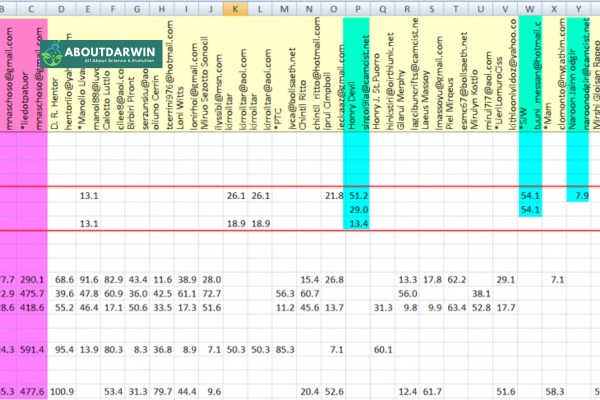
Privacy concerns in genetic genealogy extend beyond your own data. Every match in your spreadsheet has shared personal information with you, creating an obligation to handle that data responsibly. The Golden State Killer case raised awareness about how genetic databases can be used for law enforcement purposes, prompting some individuals to delete their profiles and highlighting the importance of data retention practices.
Also Read: Debunking DNA Myths and Facts About DNA and Genealogy
When dealing with genetic data, you are working with intrinsically personal information. Therefore, it is imperative to consciously seek ways of ensuring privacy when collecting and documenting such data on your DNA Match Spreadsheet.
Always remember genealogy is often a family affair, so approach information shared by relatives with utmost discretion. Be cautious when recording their details in the spreadsheet—request permission before you document any specific facts related to them. Even within families, not everyone wishes their genetic relationships publicly documented.
If needed, anonymize certain pieces of information in your records. This might involve employing pseudonyms or a coding system for matches who wish to remain anonymous. Some researchers use match IDs rather than names in shared spreadsheets, keeping the actual identities in a separate, private document.
A DNA Match Spreadsheet typically contains sensitive details reflecting upon an individual’s identity, including names or initials, generated usernames on testing sites, email addresses, and genetic relationship details like shared centimorgans and likely relation ranges.
To ensure these details do not fall into the wrong hands, always store them securely. Ideally, use password-protected electronic documents stored locally or a service offering strong encryption measures. Enable two-factor authentication on any cloud storage accounts containing your genetic data.
As part of ethical practices around handling genetic data, understand and respect each match’s right to control their personal information, including sharing choices and withdrawing access upon request. If a match asks you to remove their information from your spreadsheet, comply promptly and completely.
Limiting who has access to your spreadsheet also safeguards private information. Only share the document with people whom you trust explicitly and who need these specific insights for research. Avoid sharing your complete match list with distant cousins you have just discovered; instead, share only the specific lines relevant to your shared ancestry.
Keeping these key principles in mind can help you sufficiently shield sensitive information and respect privacy boundaries in your genealogical journey. After all, safeguarding personal data is as much part of an ethical research approach as any other careful note-taking or record-keeping effort.
Yes, several trusted templates exist. Greg Clarke’s Google Sheets template is widely recommended in genealogy communities and includes pre-built formulas for relationship predictions and data cleanup. Airtable users can access templates from Genealogy Explained that offer linked record capabilities. For Excel users, free templates are available through DNA testing forums and Facebook genealogy groups. These templates typically include preset columns for match names, shared cMs, predicted relationships, and notes fields.
Yes, sharing genetic data without consent can constitute a privacy violation. Always request permission before documenting specific details about relatives or matches in your spreadsheet. When sharing your spreadsheet with collaborators, use view-only links when possible and share only with trusted individuals. If a match requests removal of their information, comply immediately. Consider using match IDs rather than real names in shared documents, keeping actual identities in a separate private file with restricted access.
Monthly or quarterly reviews work well for most researchers. New matches appear continuously as more people test, and monthly updates ensure you do not miss important close matches. However, your review frequency should match your research intensity. Active researchers working on unknown parentage cases may check weekly, while casual researchers might update every few months. Always export or copy your data when you perform updates, as matches occasionally delete their profiles, and their information becomes permanently unavailable.
Direct API connections are limited due to Terms of Service restrictions. AncestryDNA does not provide official API access for spreadsheet integration, and third-party automation tools that previously extracted match data were blocked by security updates in 2024. Manual copy-and-paste remains the primary method for transferring data. However, tools like DNA Painter accept imports from GEDmatch, FamilyTreeDNA, and MyHeritage segment data. For AncestryDNA, Greg Clarke’s Match Table Maker spreadsheet includes formulas that clean up pasted data automatically, streamlining the manual import process.
A 3% DNA match typically represents a relationship in the range of second cousin to second cousin once removed. This percentage translates to approximately 200-225 shared centimorgans, which falls within the expected range for relatives sharing great-grandparents. However, DNA percentages can vary due to random inheritance patterns. For more precise relationship predictions, refer to the Shared Centimorgan Project ranges and consider the number of shared segments and longest segment length in addition to the total percentage.
Start by choosing your platform: Google Sheets for beginners, Excel for data analysis, or Airtable for relational features. Create columns for match name, testing company, shared cMs, number of segments, longest segment, predicted relationship, known relationship, common ancestor, maternal or paternal side, and notes. Download a free template from genealogy communities to accelerate setup. Import your match data by copying from your testing company’s website and pasting into your spreadsheet. Apply color coding to distinguish maternal and paternal lines, and use filters to sort by relationship strength or testing company.
A 25% DNA match indicates a very close relationship, typically a grandparent, grandchild, half-sibling, aunt, uncle, niece, or nephew. This percentage represents approximately 1,700-1,900 shared centimorgans. Full siblings share around 50% (2,500-3,400 cM), while first cousins share about 12.5% (575-1,300 cM). A 25% match sits squarely in the close family category, meaning you share one parent in common with this relative or they are one generation removed from you on your family tree.
Also Read: Post-Earthquake Guide
A DNA Match Spreadsheet can be an invaluable tool in the realm of genealogical research and genetic testing. It not only assists you in managing and organizing numerous genetic matches, but it also enables deeper analyses and exploration of potential familial connections through methodologies like the Leeds Method and integration with tools like DNA Painter.
However, while amassing this detailed information, privacy must never be overlooked; always respect the confidential nature of such data and obtain consent when sharing information about relatives. We also recognize that maintaining this system demands consistent updating as new matches emerge, particularly given the interface changes at testing companies in 2026.
Remember, every match could potentially bring you one step closer to uncovering your ancestral roots or solving a family mystery. Whether you choose Google Sheets for accessibility, Excel for analytical power, or Airtable for relational capabilities, the right DNA Match Spreadsheet will make navigating your genetic genealogy journey more precise and effective. Start with a template, adapt it to your needs, and let your organized data reveal the stories hidden in your DNA.