Physical Address
304 North Cardinal St.
Dorchester Center, MA 02124
Physical Address
304 North Cardinal St.
Dorchester Center, MA 02124

Chromosome browsers have become essential tools for anyone serious about genetic genealogy in 2026. If you have taken a DNA test and want to move beyond simple ethnicity estimates and match lists, understanding how to use chromosome browsers for analyzing DNA data will transform your research. These powerful visualization tools let you see exactly where you share DNA with your matches, helping you identify common ancestors and map your genetic inheritance with precision.
Here is the reality many testers face: you get your DNA results, see hundreds of matches, but have no idea how you are actually connected to most of them. The chromosome browser solves this by showing you the specific segments of DNA you share, measured in centimorgans, and their exact locations on each chromosome. This visual representation turns abstract genetic data into actionable genealogical evidence.
Before we dive deeper, I need to address a common point of confusion that trips up many beginners. AncestryDNA, the largest testing company, does not provide a chromosome browser. This frustrates many users who want to dig deeper into their matches. Fortunately, several excellent alternatives exist, and if you have tested with AncestryDNA, you can still access chromosome browser features by downloading your raw DNA data and uploading it to third-party sites.
A chromosome browser is a specialized visualization tool used in genetic genealogy to display DNA segments shared between individuals. It presents your chromosomes as numbered horizontal bars and overlays colored segments showing exactly where you match with other testers. This graphical interface transforms raw genetic data into an intuitive map that reveals inheritance patterns, shared ancestry, and genealogical connections.
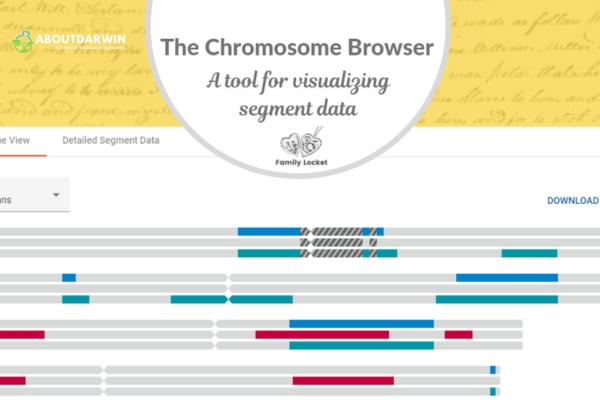
The tool works by comparing your autosomal DNA against other testers in a database. When segments match above a certain threshold (typically 7-15 centimorgans), they appear as colored blocks on the corresponding chromosome. Each chromosome pair (1 through 22, plus X for specific tests) can be examined individually, allowing you to see precisely which portions of your genome you inherited from shared ancestors.
Chromosome browsers serve two primary purposes in genetic genealogy research. First, they help verify whether matches are genuinely related through shared ancestry or if the similarity represents random chance or population-level patterns. Second, they enable the identification of specific ancestral lines by comparing multiple matches who share overlapping segments on the same chromosome regions.
Also Read: Download Raw Data from AncestryDNA: Easy, Fast How-To!
Standard DNA testing results give you match lists and estimated relationships, but they lack the precision needed for advanced genealogical work. A chromosome browser fills this gap by providing visual confirmation of shared inheritance and enabling sophisticated analysis techniques that can break through research brick walls.
The primary advantage lies in triangulation, the process of identifying three or more matches who share the same DNA segment. When multiple unrelated individuals share an identical segment, they almost certainly inherited it from a common ancestor. This technique allows you to assign specific chromosome segments to particular ancestral lines, building a chromosome map that connects your DNA to your family tree.
Chromosome browsers also help distinguish genuine matches from false positives. Small segments below 7 centimorgans often represent population-level similarities rather than recent shared ancestry. By examining segment size and location, you can focus your research on matches with substantial shared DNA, significantly increasing your chances of identifying the common ancestor.
For adoptees and individuals with unknown parentage, chromosome browsers are invaluable. They enable the identification of biological family members through shared segment analysis and help distinguish between maternal and paternal matches when combined with known relatives. Many successful reunions have started with a chromosome browser comparison that revealed unexpected family connections.
Another key benefit involves identifying which ancestral line a match belongs to. When you compare a new match against known relatives, overlapping segments immediately reveal whether they connect through your maternal or paternal side. This phasing technique saves hours of research by directing your attention to the correct branch of your family tree from the start.
Also Read: Centimorgans Mystery – How Many Do Half Siblings Share?
Not every DNA tester needs a chromosome browser immediately. If you are just beginning your genetic genealogy journey and primarily want ethnicity estimates and basic matches, standard testing company features suffice. However, several situations indicate it is time to start using a chromosome browser for deeper analysis.
You need a chromosome browser when you want to verify distant relationships. Estimated relationships like “4th to 6th cousin” cover a wide range of possibilities. By examining shared segments, you can determine whether a match falls on the closer or distant end of that estimate and whether the relationship is worth pursuing with traditional genealogical research.
Adoptees and individuals with unknown parentage absolutely require chromosome browser access. The visual comparison of segments helps identify close biological relatives and distinguish between maternal and paternal matches. Without this tool, finding biological family becomes significantly more difficult because you cannot see how matches connect to each other.
If you are working on a specific genealogical brick wall, particularly from the 1800s or earlier, chromosome browsers become essential. They allow you to identify multiple descendants of a suspected ancestor and verify that they all share the same chromosome segments. This triangulation provides genetic proof that your paper trail research has identified the correct common ancestor.
Endogamous populations, where cousins have historically married cousins, create complex DNA matching situations. If your ancestry includes Ashkenazi Jewish, Acadian, or certain isolated populations, you will have many matches that share multiple ancestral lines. A chromosome browser helps sort through this complexity by showing exactly which segments come from which ancestors.
Understanding which companies offer chromosome browsers helps you choose where to test or upload your DNA. The availability of this feature varies significantly between testing companies, and knowing your options ensures you can access the tools you need for your research goals.
23andMe provides a chromosome browser for all customers who opt into DNA Relatives. Their tool allows comparison with up to five matches simultaneously and includes both half-identical and fully-identical segment visualization. The 23andMe chromosome browser received significant updates in early 2026, improving the interface and adding more detailed segment information.
MyHeritage offers one of the most comprehensive chromosome browsers available. Their tool includes one-to-one and one-to-many comparison options, triangulation features, and detailed segment information including centimorgan counts and chromosome positions. MyHeritage accepts free uploads of DNA data from other testing companies, making their chromosome browser accessible to AncestryDNA testers.
FamilyTreeDNA (FTDNA) includes chromosome browser functionality with their Family Finder test. Their browser displays up to five matches at once and provides detailed segment data that can be downloaded for use with third-party tools like DNA Painter. FTDNA also offers additional analysis tools including a matrix view and integrated surname analysis.
GEDMatch, a third-party database, provides the most powerful chromosome browser features available. Their free Tier 1 tools include a one-to-one comparison with detailed segment analysis and the ability to compare multiple kits simultaneously. GEDMatch accepts uploads from all major testing companies, making it the universal solution for chromosome browser access regardless of where you originally tested.
AncestryDNA notably does not offer a chromosome browser. This is the most common frustration expressed in genealogy forums. AncestryDNA testers who want chromosome browser functionality must download their raw data and upload it to MyHeritage, GEDMatch, or another site that provides this feature.
Also Read: Top Free DNA Upload Websites for Ancestry & Health Analysis
Using a chromosome browser effectively requires understanding both the technical interface and the genealogical interpretation of results. Each platform has slightly different navigation and features, but the fundamental principles remain consistent across all chromosome browsers.

When you open a chromosome browser, you will see numbered horizontal bars representing chromosomes 1 through 22, plus the X chromosome if applicable. Colored segments overlaid on these bars show where you share DNA with selected matches. The length of each segment, measured in centimorgans (cM), indicates the strength of the genetic relationship. Longer segments suggest closer relationships or more recent common ancestors.
Each platform uses different colors to distinguish between matches, but the underlying data remains the same. Clicking on a segment typically reveals additional details including the exact chromosome position, the number of single nucleotide polymorphisms (SNPs) tested in that region, and the total centimorgan count. Understanding centimorgans and their significance is essential for interpreting these results accurately.
To begin using a chromosome browser, you need DNA test results from a company that provides this feature or raw data that you can upload to a third-party site. If you tested with 23andMe, MyHeritage, or FamilyTreeDNA, chromosome browser access is built into your account. AncestryDNA customers should download their raw DNA data and upload it to MyHeritage or GEDMatch.
Once you have access, start by selecting one or two known relatives as test cases. Compare your DNA with a parent, sibling, or known cousin. This familiarizes you with the interface and shows you what genuine close family matches look like. Notice how the segments appear, their colors, and the centimorgan values displayed. This baseline understanding helps you evaluate unknown matches later.
Each chromosome browser platform has unique features and navigation. Understanding these differences helps you choose the right tool for your specific research needs.
23andMe Chromosome Browser: Access the browser through the DNA Relatives section after opting into open sharing. Select up to five matches and click “Compare” to see shared segments. The 23andMe browser distinguishes between half-identical regions (one shared chromosome) and fully-identical regions (both chromosomes shared), which helps identify close relatives versus distant cousins.
MyHeritage Chromosome Browser: Navigate to DNA Matches, select a match, and click “Review DNA Match” then “Chromosome Browser.” MyHeritage allows comparison of multiple matches and includes a triangulation feature that automatically identifies segments shared between three or more people. The site also provides an “All Segments” view showing every shared segment with detailed statistics.
FamilyTreeDNA Chromosome Browser: Find the browser under the Chromosome Browser tab in your Family Finder results. FTDNA displays up to five matches simultaneously and includes a matrix view that shows which of your selected matches also match each other. This matrix is invaluable for identifying groups of related individuals who likely descend from the same ancestral line.
GEDMatch Chromosome Browser: The GEDMatch one-to-one comparison tool provides the most detailed segment analysis available. Enter two kit numbers to see precisely where they match, including segment start and stop positions, centimorgan values, and SNP counts. GEDMatch also offers a one-to-many tool for comparing one kit against an entire database, useful for finding unknown relatives.
The true power of chromosome browsers emerges when you compare multiple matches simultaneously. This comparative analysis reveals whether matches share the same ancestral segments and enables triangulation, the gold standard for confirming genetic relationships.
To perform triangulation, identify two or more matches who share overlapping segments on the same chromosome region. If these matches also match each other on that same segment, you have triangulated a segment that likely came from a common ancestor. This technique requires all three individuals to share the identical segment, confirming identical by descent (IBD) inheritance rather than coincidence.
Many genealogists export triangulated segment data to DNA Painter for chromosome mapping. This involves painting each confirmed segment onto a chromosome map, assigning colors to different ancestral lines. Over time, this creates a visual representation of your genetic inheritance that directly connects your DNA to specific ancestors on your family tree.
For a more detailed explanation of the triangulation process, see our guide on AncestryDNA triangulation techniques. While AncestryDNA lacks a chromosome browser, the triangulation principles apply universally across all platforms.
Understanding the limitations of chromosome browsers prevents common mistakes and ensures you interpret results correctly. These tools are powerful but not infallible, and recognizing their constraints helps you avoid false conclusions in your research.
Small segments below 7 centimorgans often represent population-level genetic patterns rather than recent shared ancestry. These segments appear by chance in unrelated individuals from the same ethnic backgrounds. Relying on small segments for genealogical conclusions frequently leads to incorrect assumptions about relationships. Most experts recommend focusing on segments above 15 centimorgans for reliable conclusions.
Chromosome browsers cannot distinguish between maternal and paternal matches without additional information. They show that you share DNA with someone, but not whether that connection comes from your mother or father. You must compare matches against known relatives or use phasing techniques to determine which side of your family a match belongs to.
The tool only shows shared segments, not the genealogical relationship itself. Two people might share a substantial segment but be related through a distant ancestor that you will never identify through records. Chromosome browsers confirm that a genetic relationship exists, but traditional genealogical research still determines exactly how you are related.
Platform-specific thresholds affect what you see. Each company sets minimum segment sizes for display, typically around 7 centimorgans. Segments below this threshold disappear from view, potentially hiding legitimate distant relationships. Understanding your platform’s threshold settings helps you interpret what you are and are not seeing.
Using chromosome browsers involves important privacy decisions that every tester should understand. Different platforms have different privacy policies and opt-in requirements, and knowing these distinctions helps you make informed choices about your genetic data.
23andMe requires explicit opt-in to DNA Relatives before you can use their chromosome browser. This means your matches must choose to participate in open sharing before you can compare segments with them. If a match has not opted in, they will not appear in your DNA Relatives list, and you cannot analyze shared segments with them.
Third-party sites like GEDMatch operate under different privacy frameworks. When you upload to GEDMatch, your kit becomes visible to other users who can compare their DNA against yours. GEDMatch allows law enforcement matching, which has helped solve cold cases but raises privacy concerns for some users. Understanding these trade-offs helps you decide whether third-party uploads align with your privacy preferences.
MyHeritage offers more granular privacy controls. You can upload your DNA and use the chromosome browser while restricting how other users see and interact with your data. This makes MyHeritage an attractive option for users who want chromosome browser functionality without fully public visibility.
If privacy is a primary concern, consider testing with companies that offer chromosome browsers natively rather than uploading to third-party databases. 23andMe, MyHeritage, and FamilyTreeDNA all provide browser features within their controlled environments, reducing the need to share data across multiple platforms.
A chromosome browser is a visualization tool that displays your DNA as numbered horizontal bars representing chromosomes 1 through 22. It overlays colored segments showing exactly where you share DNA with genetic matches. This allows you to see the specific chromosome locations, segment lengths measured in centimorgans, and positions of shared genetic material, transforming raw DNA data into an intuitive map for genealogical analysis.
Yes, 23andMe provides a chromosome browser for all customers who opt into DNA Relatives. The tool allows comparison with up to five matches simultaneously and displays both half-identical and fully-identical regions. 23andMe’s chromosome browser was significantly updated in early 2026, improving the interface and adding more detailed segment information for better genealogical analysis.
AncestryDNA, the largest DNA testing company, does not provide a chromosome browser. This is a major limitation that frustrates many genealogists who want to analyze their matches in detail. AncestryDNA customers who need chromosome browser functionality must download their raw DNA data and upload it to third-party sites like MyHeritage, GEDMatch, or FamilyTreeDNA that offer this feature.
Yes, MyHeritage offers one of the most comprehensive chromosome browsers available. Their tool includes one-to-one and one-to-many comparison options, built-in triangulation features, and detailed segment information with centimorgan counts and chromosome positions. MyHeritage also accepts free uploads of DNA data from other testing companies, making their chromosome browser accessible to testers from AncestryDNA, 23andMe, and FamilyTreeDNA.
Reading chromosome browser results involves examining colored segments overlaid on chromosome bars. Each segment represents shared DNA with a match. The length, measured in centimorgans (cM), indicates relationship strength – longer segments typically mean closer relationships. The chromosome number shows which chromosome contains the shared segment, and the position indicates where on that chromosome the match occurs. Segments above 15 cM are generally significant, while those below 7 cM may represent population-level patterns rather than recent shared ancestry.
DNA triangulation is the process of identifying three or more matches who share the exact same DNA segment. When multiple unrelated individuals share an identical segment in a chromosome browser, they almost certainly inherited it from a common ancestor. This technique confirms that a shared segment is identical by descent (IBD) rather than coincidence, providing strong evidence for genealogical conclusions about ancestral connections.
Yes, several chromosome browsers are available for free. GEDMatch offers free tier access to their one-to-one chromosome comparison tool. MyHeritage provides free chromosome browser access to users who upload their DNA data from other testing companies. FamilyTreeDNA includes chromosome browser functionality with their Family Finder test purchase. AncestryDNA customers can access free chromosome browsers by uploading to these third-party sites.
For reliable chromosome browser analysis, focus on segments above 15 centimorgans for confident conclusions about recent ancestry. Segments between 7 and 15 centimorgans may represent legitimate distant relationships but require additional verification through triangulation. Segments below 7 centimorgans often represent population-level patterns rather than genealogical connections and should generally be ignored for relationship determination. Each chromosome browser platform allows you to set minimum threshold filters for segment display.
Chromosome browsers for analyzing DNA data have revolutionized genetic genealogy, offering visual precision that transforms how we understand our genetic inheritance. Whether you are verifying distant relationships, breaking through brick walls, or searching for biological family, these tools provide the detailed segment analysis necessary for confident conclusions about your ancestry.
The key to success lies in choosing the right platform for your needs. 23andMe, MyHeritage, and FamilyTreeDNA offer built-in chromosome browsers, while GEDMatch provides the most powerful analysis tools for uploaded data. AncestryDNA customers can access chromosome browser features by downloading their raw DNA data and uploading to free DNA upload websites.
Remember that chromosome browsers are tools for exploration, not magic solutions. They confirm genetic relationships but cannot replace traditional genealogical research. The combination of segment analysis, triangulation techniques, and careful documentation creates a powerful approach to understanding your genetic heritage. As you explore your results in 2026, use these tools thoughtfully, respect privacy considerations, and enjoy the journey of discovering the stories written in your DNA.


